
Keysafe settings
In the Keysafe settings, you can specify and customize important configurations for your safe. The settings are divided into two areas: the safe configuration and the system settings.
The safe configuration is generally not relevant to you and is set up by us once. Therefore, changes in this area should be avoided as they could compromise the functionality of the safe.
The system settings, on the other hand, are important for you. Here you can adjust in three sub-items: the system settings, the quick booking, pick-up, and return process, and the settings for automatic logout. These options allow you to customize the operation of the locker to suit your needs.
System settings:
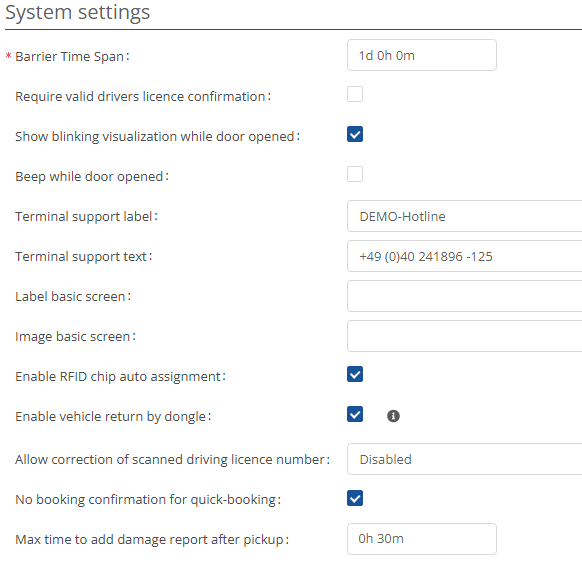
Here you can store the general settings for the safe. The safe interval is a mandatory field and must be specified. For all other fields, you do not need to enter anything if there is no requirement, such as hotline text or label for the basic screen.
Quick booking, pick-up, and return workflow:
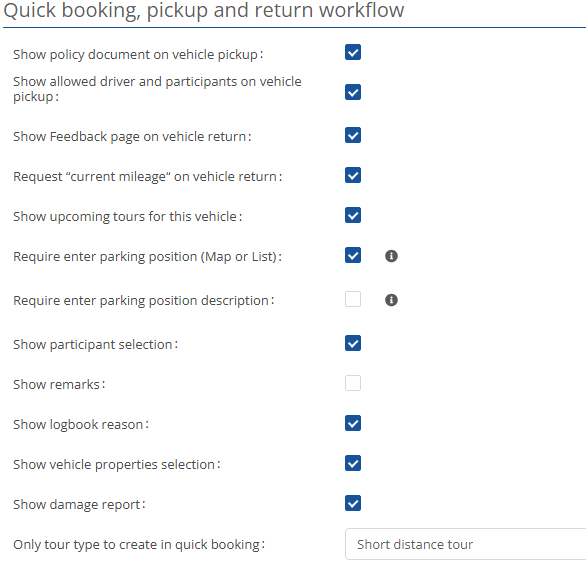
Here you have the option of defining processes and queries for quick bookings. These are not mandatory but can significantly simplify and improve work processes.
Automatic logout settings:
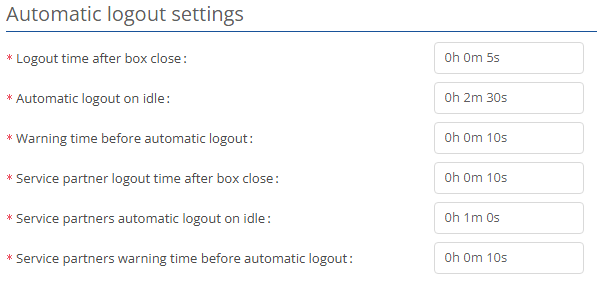
In this section, you can set times for automatic logout.